Category: Operations and Adoption

Running the library once it is live. Migrating without losing the provenance that lives in folder paths and filenames, the seven-state asset lifecycle from brief to archive, and the operating model that stops a successful launch from quietly decaying into a shared drive with a subscription. The contribution cost is the constraint, and this is where it gets addressed.

  • The asset lifecycle, from brief to archive

    The asset lifecycle, from brief to archive

    Somebody searches the library, finds four versions of the same product shot, and has no way to tell which one is current. So they ask in a channel, someone answers from memory, and the wrong one goes to print.

    The library was not wrong. It contained all four. It just had no opinion about any of them, because the only states it modelled were present and absent.

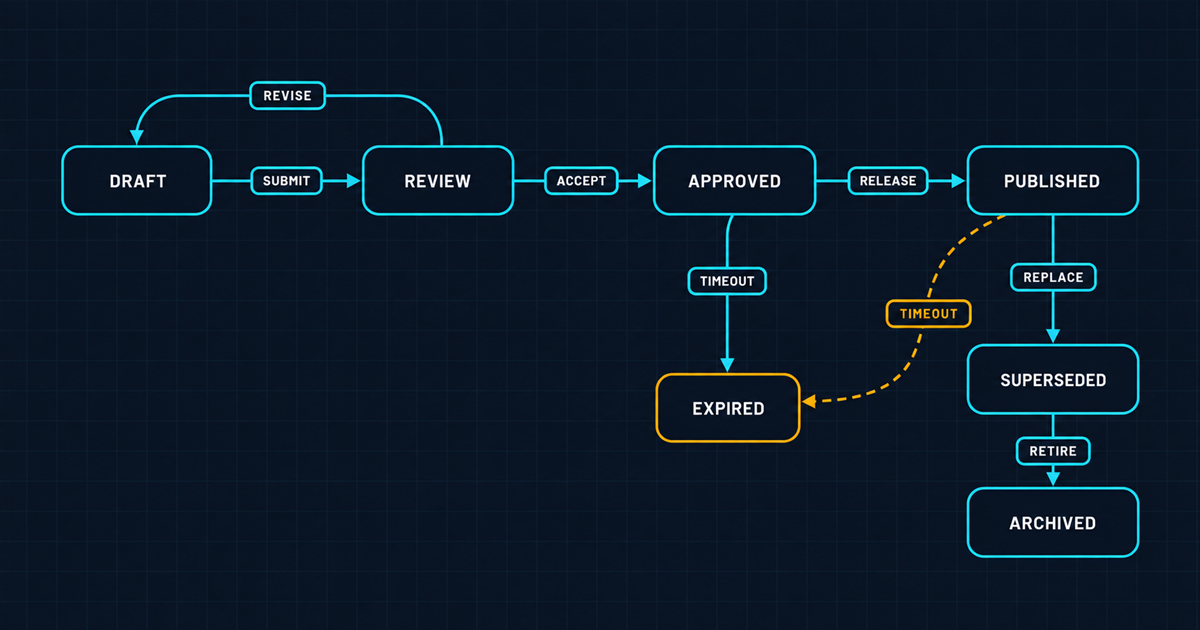
    Short answer: an asset needs a state, the state needs to be visible in search, and every transition between states needs a defined trigger and a recorded actor. Seven states cover almost every enterprise case: draft, in review, approved, published, superseded, expired, archived. Without them a DAM is a well-indexed pile, and people go back to asking colleagues, because a colleague at least has an opinion.

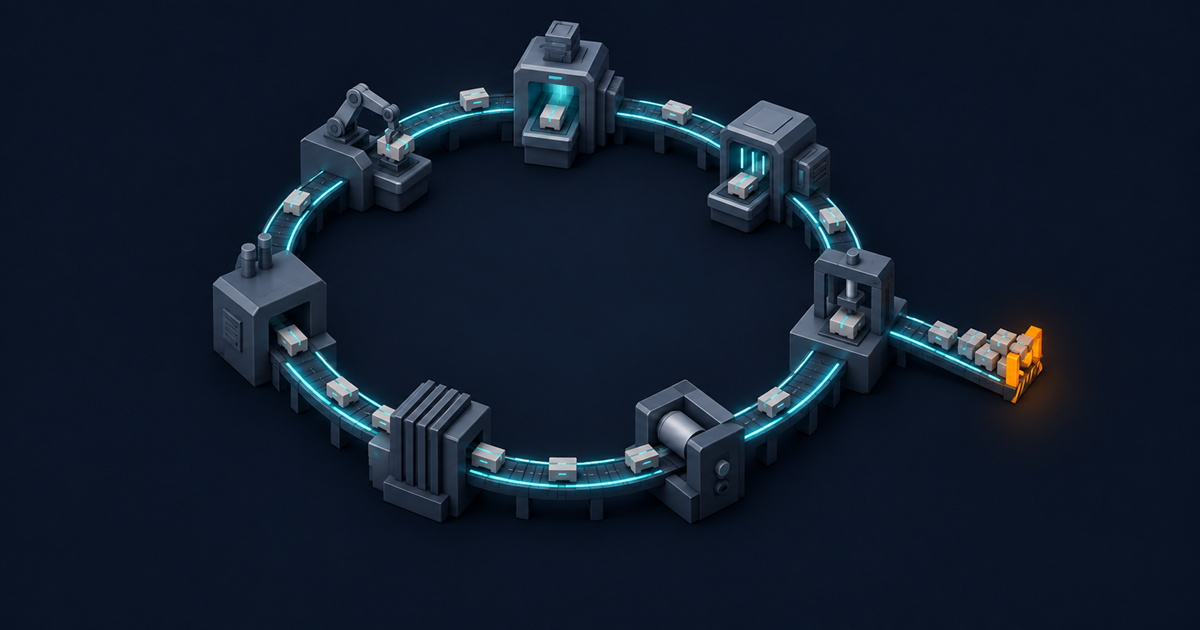
    An isometric seven-station production loop connected by a raised cyan track, with a siding dead-ending at an amber buffer where carriers have piled up

    The seven states

    Draft. In the system, not usable. Working files, first cuts, material awaiting selection. Excluded from default search. The reason to hold drafts at all is that the alternative is people holding them on desktops, where they are invisible and unbacked.

    In review. Submitted for approval, with a named approver and a due date. Visible to the review path only.

    Approved. Cleared for use. This is the state most search should default to, and getting that default right is most of what makes a library trustworthy.

    Published. In active use on at least one surface. Distinct from approved, and the distinction matters: approved means allowed, published means currently out there. You cannot execute a recall without knowing which assets are published and where.

    Superseded. A newer version exists. Still resolvable, because things printed last year should keep working, but never offered as a new choice.

    Expired. Rights have ended. Not deleted, not usable. Findable deliberately, invisible by default. The behaviour required at this transition is the subject of rights and expiry as first-class asset data.

    Archived. Past active life, retained for record or legal reasons. Often on cheaper storage, often with slower retrieval, and that is fine as long as the metadata stays in the main index so people can find out it exists.

    Most implementations model three of these. The four that get skipped, published, superseded, expired and archived, are exactly the four that determine whether the library can be trusted.

    A state machine of seven labelled nodes with directed cyan arrows, the expired node amber and a dashed amber arrow bypassing review

    What each transition requires

    A state is only meaningful if the transition into it is controlled. Three properties per transition, every time:

    • A trigger. Human action, elapsed time, or an event from another system. Write it down. Transitions with no defined trigger do not happen.
    • A recorded actor. Who or what caused it, with a timestamp. This is your audit evidence and it should be a by-product of the transition, not something anyone assembles later.
    • A downstream consequence. What else changes. Search visibility, notifications, cache invalidation, an event emitted to consuming systems.

    That third property is where implementations usually fall short. An asset that becomes expired inside the DAM while remaining live on a public page has changed a field, not a state. The event mechanism that closes that gap is covered as pattern two in integration patterns for an enterprise DAM, and notification hooks are the usual implementation.

    The unofficial path

    There is always one. In most organisations it is approved-to-published without passing through review, because a deadline moved and someone with authority said go.

    Do not design it out. Design it in, with a record.

    An emergency path that requires a named override reason and a nominated approver gives you three things: the work gets done, the exception is visible, and the exception rate becomes a metric you can review. An emergency path that does not exist officially gets used anyway, off-system, and produces no record at all.

    Exception rate is one of the more useful numbers in the whole governance framework. A rising override rate means the standard path is too slow, which is a process problem you can fix rather than a compliance problem you can only report.

    Versions, variants and derivatives

    Three different things, routinely conflated, and the conflation is why version questions are so hard to answer.

    A version is the same asset, changed. Retouched, colour corrected, updated logo. Linear history, one current version, older ones retained. Platform-level version management handles this, and it should be automatic rather than a naming convention.

    A variant is a deliberately different asset in the same family. The winter version of the campaign key visual, the alternate model, the horizontal composition. These are siblings, each with its own lifecycle state, and they are not versions of each other even though people file them that way.

    A derivative is a mechanical output. The 400px crop, the WebP conversion, the CMYK export. Under a derivation model these are not stored at all, they are produced from the current version on request, which means they cannot be stale and they have no lifecycle of their own. That is the property discussed in single source of truth is an architecture.

    If your library treats all three as “files that look similar”, version questions become unanswerable, which is the situation described at the top of this piece.

    Where does retention fit?

    At the end, and it is the part almost every implementation defers indefinitely.

    Retention means two decisions per asset class: how long it is kept after active use, and what happens then. Records management has a century of thinking on this and the principles carry over directly, with one difference specific to visual material: images of identifiable people carry obligations under GDPR that do not attach to most other document types, so “keep everything forever” is not the risk-free default it appears to be.

    Practical guidance:

    • Set retention by class, not by asset. Product photography, campaign material, event photography, brand assets. Four to six classes covers most estates.
    • Default to retain, but define the exceptions. Material with identifiable people and material with expired third-party rights are the two classes where indefinite retention is an active risk.
    • Never hard-delete without an approval path. Deletion is the one irreversible operation in the whole system and it deserves a named approver and a record.
    • Archive is a state, not a location. Moving to cheap storage is an implementation detail. What matters is that the asset stays findable and its metadata stays in the index.
    A cold storage archive aisle receding into darkness, one shelf pulled out and lit from within by a cyan strip, a single amber lamp far down the aisle

    Starting before the asset exists

    The highest-leverage change available in lifecycle design is to start it at the brief rather than at the upload.

    When a shoot is commissioned, everything you will later ask a cataloguer to guess is already known and written down: the campaign, the products, the market, the intended channels, the licensing terms negotiated with the photographer. Capturing that as a record before any asset exists, then attaching arriving assets to it, converts cataloguing from an act of reconstruction into an act of association.

    The difference in both cost and quality is substantial, and it removes most of the contribution burden that drives the pattern in why DAM rollouts fail. It also means the rights fields are populated by the person who actually negotiated the rights, which is the only person who reliably knows them.

    Very few organisations do this. The ones that do have noticeably better libraries, and it is a process change rather than a platform feature, so it is available to you regardless of what you have bought.

    Keep the model small

    Seven states is not a target, it is a ceiling. If your workflow diagram has fourteen states and nine conditional branches, it will be implemented once, understood by two people, and routed around by everyone else.

    The test is whether a contributor can describe the lifecycle from memory. If they cannot, it is not a lifecycle, it is a specification, and specifications do not govern behaviour.

    The field model that carries the state is in the metadata schema an enterprise actually needs, status as a search facet is covered in designing a taxonomy people actually use, and the reason any of it matters is in what enterprise DAM actually is.

  • Why DAM rollouts fail after a successful launch

    Why DAM rollouts fail after a successful launch

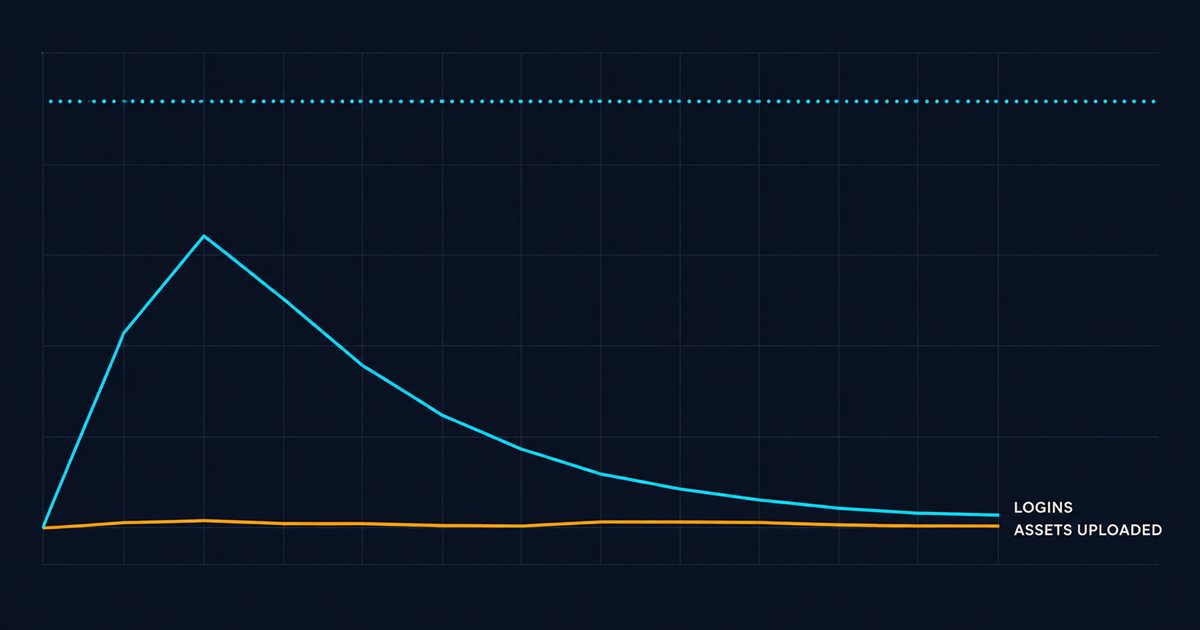
    Launch week is good. Attendance at training is high, the login numbers are strong, the executive sponsor sends a note. Everything is working.

    Month four, uploads have flatlined. Month six, the brand team has a folder again. Nothing broke. Nobody complained. The system simply stopped being where the work happened.

    Short answer: DAM rollouts fail because the DAM is a cost to contributors and a benefit to consumers, and nobody funds the contribution side. Uploading and describing an asset takes real minutes and delivers value to someone else, later. Unless that cost is removed, paid for, or made unavoidable, contribution decays to zero and the library ages out. Everything else people call an adoption problem is downstream of this.

    An isometric scene of a polished cyan-edged building with an empty entrance ramp, and a well-worn amber dirt path leading round it to a cluster of improvised sheds

    The asymmetry, precisely

    Two populations, opposite incentives.

    Consumers get immediate value. They find something in thirty seconds that used to take fifteen minutes. They need no persuading and they will use the system happily forever.

    Contributors pay the whole cost. Uploading, categorising, filling in rights fields, attaching approval evidence. It takes minutes per asset, it produces no benefit to the contributor, and the beneficiary is an anonymous colleague at an unspecified future date.

    Every metric that looks like adoption failure follows from this. Login counts stay high because consumers keep coming. Upload counts fall because contributors stop paying. And because consumption looks healthy on the dashboard, the decay is invisible for two quarters.

    An adoption curve chart with a cyan logins line spiking at launch then decaying, and an amber assets-uploaded line that never leaves the floor

    The four failure mechanisms

    1. Contribution is unfunded. Nobody’s objectives include cataloguing. The studio manager is measured on output, the agency is paid for deliverables, the campaign lead is measured on the campaign. Describing assets is the thing everyone does last and therefore does not do.

    2. The system is not where the work is. If contributing requires opening a second application, the fraction of people who do it is much smaller than you would guess. This is not laziness, it is context switching cost, and it is why the embedded picker pattern in integration patterns is an adoption intervention rather than a technical one.

    3. Search does not work well enough, early enough. Consumers give it two or three chances. If the first searches fail because the library is thin or the metadata is sparse, they revert to asking a colleague and never come back. Adoption is won or lost in the first month of consumer experience, which is why launching with a small well-described library beats launching with a large badly-described one.

    4. Nobody owns it. The programme had a project manager. The project ended. The role did not become a job, so schema drift, vocabulary sprawl and permission decay accumulate with nobody watching, and the governance framework becomes a document about a system nobody is running.

    The operating model

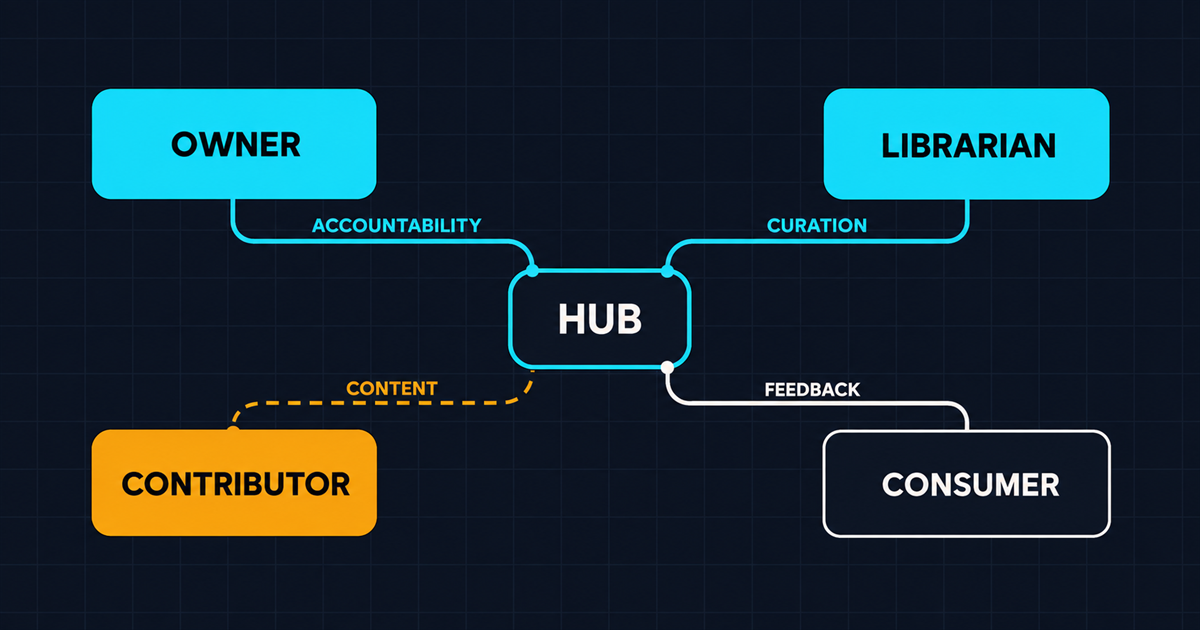
    Four roles. They do not each need a person, but each needs a named owner with allocated time.

    Platform owner. Accountable for the system: roadmap, vendor relationship, integrations, budget. Usually part of a marketing operations or digital function. Roughly 0.3 to 0.5 FTE at mid enterprise scale.

    Librarian. Owns the schema, the vocabularies and data quality. Reviews the metrics, approves vocabulary changes, fixes what is broken. This is the role most often left unfilled and the one whose absence is most visible after eighteen months. Between 0.5 and 1.0 FTE depending on ingest volume.

    Contributors. The studios, agencies and campaign teams who put material in. The critical design question is not who they are but whether contributing is in their brief and their contract.

    Consumers. Everyone else. Need nothing from you except that search works.

    The two that get missed are librarian and the contractual half of contributor. If your agency contracts do not specify that assets are delivered into the DAM with completed metadata, they will be delivered by email in a zip file, and you will pay someone internally to do the cataloguing that the agency was better positioned to do.

    Change your agency statement of work at the next renewal. It is the highest-leverage single intervention available and it costs nothing.

    An operating model figure with owner, librarian, contributor and consumer role cards, the contributor card amber with a broken dashed connector

    Removing the contribution cost

    Since contribution is the bottleneck, most of your effort should go into making it cheaper rather than into persuading people it matters.

    Automate every field you can. Dimensions, format, colour, detected subject, extracted text. None of these should ever be typed. Machine analysis on ingest, such as automatic asset analysis, populates the descriptive layer so humans only supply the business context that machines cannot know. This alone can halve the fields on the form.

    Set defaults from context. If the upload comes from the German product studio integration, market and business unit are known. Do not ask. Server-side upload presets let you bind those rules to the ingest path rather than to the person.

    Cut the form. Six required fields, not twenty. The reasoning is in the metadata schema an enterprise actually needs, and the adoption argument is simply that every field is a cost multiplied by every asset.

    Ingest where the work already happens. Watched folders, direct connectors from the studio’s tools, automated delivery from the agency’s system. The best upload is the one nobody performed.

    Catalogue at the point of highest knowledge. The person who commissioned the shoot knows what it is for. Two months later, nobody does. Capturing metadata from the brief at commissioning time, before the asset exists, is unusual and it works remarkably well.

    How do you tell if adoption is actually failing?

    Not from login counts. Four measures that tell the truth:

    • Contribution rate. New assets per month against your estimate of assets created per month. The gap is your shadow library, and it is the single most important number in the whole programme.
    • Metadata completeness on new assets. Falling completeness means people are gaming the form, which means the form is too long or the fields are unclear.
    • Zero-result search rate. Rising means the library is not keeping up with what people need, which is the consumer-side symptom of a contribution problem.
    • Proportion of published placements referencing the DAM. If your CMS can tell you how many images on the live site come from the DAM versus uploaded locally, that number is the closest thing to ground truth you will get. It is usually sobering.

    Review these monthly for the first year. Not because you will act every month, but because the decay is gradual and only visible as a trend.

    What actually works, in order

    Make the DAM the only path. Not a policy, an architecture. If the CMS can only place images that come from the DAM, the shadow library has nowhere to go. This is uncomfortable and it is the single most effective intervention available. Introduce it after search is good, never before.

    Fund the librarian. A funded 0.6 FTE beats a policy document and an all-hands presentation, every time.

    Launch small and well described. A thousand assets that are findable creates advocates. Fifty thousand that are not creates a reputation that takes two years to shake off. This is also why migration should leave most of the library behind.

    Fix agency and studio contracts. Metadata is a deliverable. Write it in.

    Publish the numbers. Monthly, to the sponsor, including the bad ones. A programme that reports honestly gets support when it needs it. One that reports only launch metrics gets quietly defunded at the next budget round.

    None of this is about training. Training is necessary and it is not the constraint. The constraint is that somebody has to pay the contribution cost, and until you decide who, the answer will be nobody.

    The taxonomy discipline that keeps search working is in designing a taxonomy people actually use, the state model behind it is in the asset lifecycle, the funding argument belongs in the business case, and the foundation is in what enterprise DAM actually is.

  • Migrating a million assets without losing provenance

    Migrating a million assets without losing provenance

    The migration plan says twelve weeks. Week one moves four hundred thousand files without incident and everybody relaxes. Week nine is still going, because somebody noticed that the folder names encoded the campaign, the campaign is not a field in the target system, and eleven months of context evaporated on the way across.

    Short answer: a DAM migration is a metadata project with a file copy attached, not the other way round. Most of what makes an asset useful lives outside the file, usually in folder paths, filenames, spreadsheets and people’s heads. Extract that first, map it explicitly, validate the mapping on a sample, and only then move bytes. And leave most of the library behind, because most of it is not worth the cost of bringing.

    An isometric mass migration: thousands of matte tiles on the left, a cyan transfer bridge with an inspection arch, ordered tiles on the right, and a few amber tiles face down with tags stripped

    Where the context actually lives

    Before you plan anything, go and look at where meaning is currently stored. In a typical enterprise estate it is in five places, and only one of them is the file.

    • Folder paths. Usually the richest source. /2025/Campaigns/AutumnRange/DE/Approved/ carries year, activity, campaign, market and status. That is five fields, encoded positionally, undocumented, and inconsistent after the third reorganisation.
    • Filenames. Version numbers, crop indicators, photographer initials, client codes. Also positional, also undocumented, also inconsistent.
    • Embedded metadata. IPTC and EXIF fields, where they survived. Check with ExifTool rather than assuming. Most production pipelines strip these on export, so coverage is usually far lower than people expect.
    • Side files and spreadsheets. The tracking sheet the studio maintains. Nearly always the best source of rights information, and nearly always in a shared drive nobody mentioned in the discovery workshop.
    • People. Which is not migratable, which is why the discovery interviews have to happen before anyone’s notice period starts.

    Write an extraction plan for each of the first four. The fifth is why you do this now rather than later.

    The sequence

    Nine steps. Skipping any of the first four is how twelve weeks becomes nine months.

    1. Inventory. Count distinct masters, not files. Hash everything and group by hash. The duplicate ratio you find is the first real number in the project and it is usually somewhere between 3:1 and 8:1. It also tells you how much of the migration you can simply not do.

    2. Profile. For each source of context, measure coverage. What percentage of assets have a parseable folder pattern, a usable filename convention, embedded metadata, a spreadsheet row. This determines the mapping strategy and it is a day of work.

    3. Decide what moves. The single most valuable decision in the project. Criteria that work in practice: accessed in the last two years, or referenced by a live placement, or carrying third-party rights, or part of the current brand system. Everything else stays where it is, in a read-only archive, reachable but not migrated.

    Expect this to eliminate somewhere between fifty and eighty percent of the library. That is not data loss, it is declining to pay to move things nobody will ever open. Everyone finds this uncomfortable and everyone who does it is glad afterwards.

    4. Map fields explicitly. Source expression to target field, one row per rule, written down and reviewed. Regular expressions over paths and filenames, lookups against spreadsheets, defaults for the rest. This artefact is the migration; the code is just an implementation of it.

    5. Dry run on a stratified sample. Two thousand assets chosen to cover every folder pattern you found, not two thousand at random. Random samples miss the weird corners, and the weird corners are the whole problem.

    6. Review the sample with the people who own the material. Not with the migration team. The cataloguers and brand managers will spot in ten minutes what an engineer cannot spot at all, because they know what the values are supposed to mean.

    7. Migrate in waves, grouped by source pattern rather than by volume. Each wave validates the mapping rules for that pattern before the next one runs.

    8. Reconcile every wave. Count in, count out, checksum match, required-field completeness. A wave that does not reconcile does not get signed off, and the next wave does not start.

    9. Cut over reads before writes. Point consumers at the new system while the old one is still writable, then close writes on the old system once traffic is stable. Reversing that order is how you end up with two live systems and a merge problem.

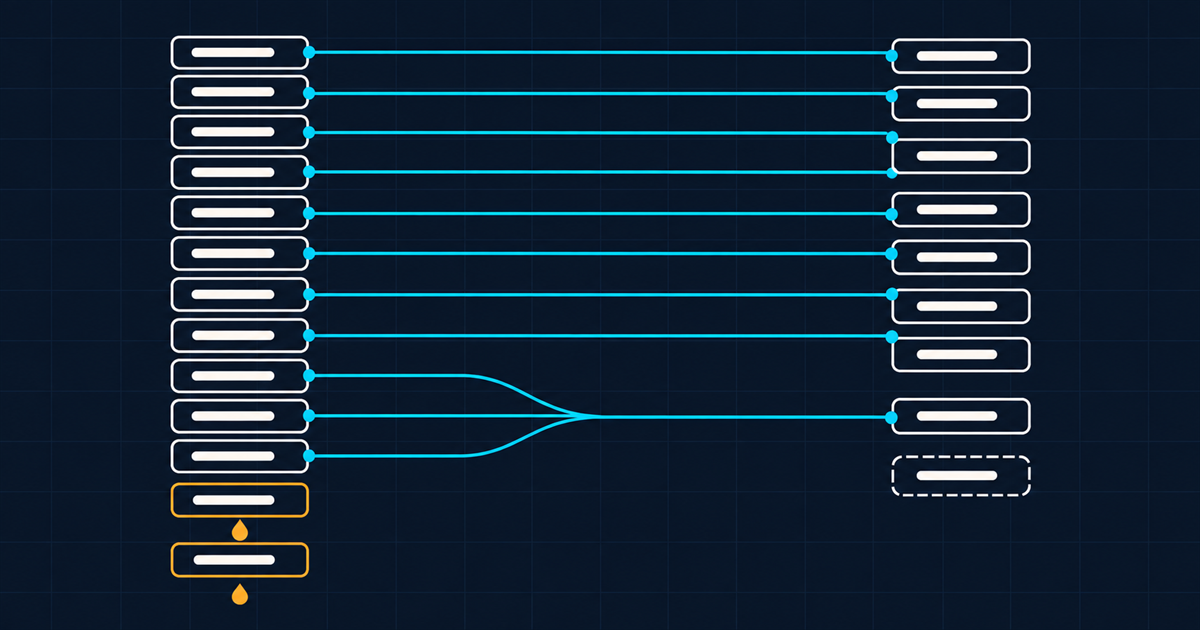
    A field mapping figure with mostly clean cyan one-to-one lines, three converging many-to-one lines, and two amber source slots with drop icons

    What gets silently lost

    Five things, and the word to notice is silently. None of these throws an error.

    Folder-encoded context, if you copy the tree as a tree instead of parsing it into fields. The most common single failure, and the most expensive, because it is only detected months later when search does not work.

    Version relationships. Which file superseded which. Usually encoded in filenames, usually discarded, and once gone it is unrecoverable because the information was never anywhere else.

    Usage history. Where an asset was published. Rarely captured anywhere and therefore rarely migrated, which matters the first time you need to recall something.

    Rights terms, if they lived in a spreadsheet rather than a field. This one has legal consequences, and it is worth doing manually for the licensed subset even if everything else is automated. The field model to migrate into is in rights and expiry as first-class asset data.

    Approval state. Often expressed as a folder called Approved, which is exactly the kind of thing a naive path copy turns into a directory nobody looks at.

    Do you migrate the derivatives?

    No. This is one of the few genuinely easy calls in the project.

    If your source library contains a master plus fourteen crops and format variants, migrate the master. In a platform where renditions are derived from a URL parameter rather than stored, the fourteen variants have no reason to exist on the far side, and the transformation reference covers what replaces them. You will reduce the volume to be moved by an order of magnitude and eliminate a whole class of “which crop is current” questions permanently.

    Two exceptions worth handling deliberately. Hand-retouched variants are not derivatives, they are separate masters, and they need identifying before you delete anything. And any derivative whose URL is referenced by a live external system needs a redirect or a replacement reference, which is the same problem as any URL change.

    For the mechanics of bringing material in at volume, the migration documentation covers bulk approaches, and the command line interface is generally the more practical tool than hand-rolled scripts for anything above a few thousand assets.

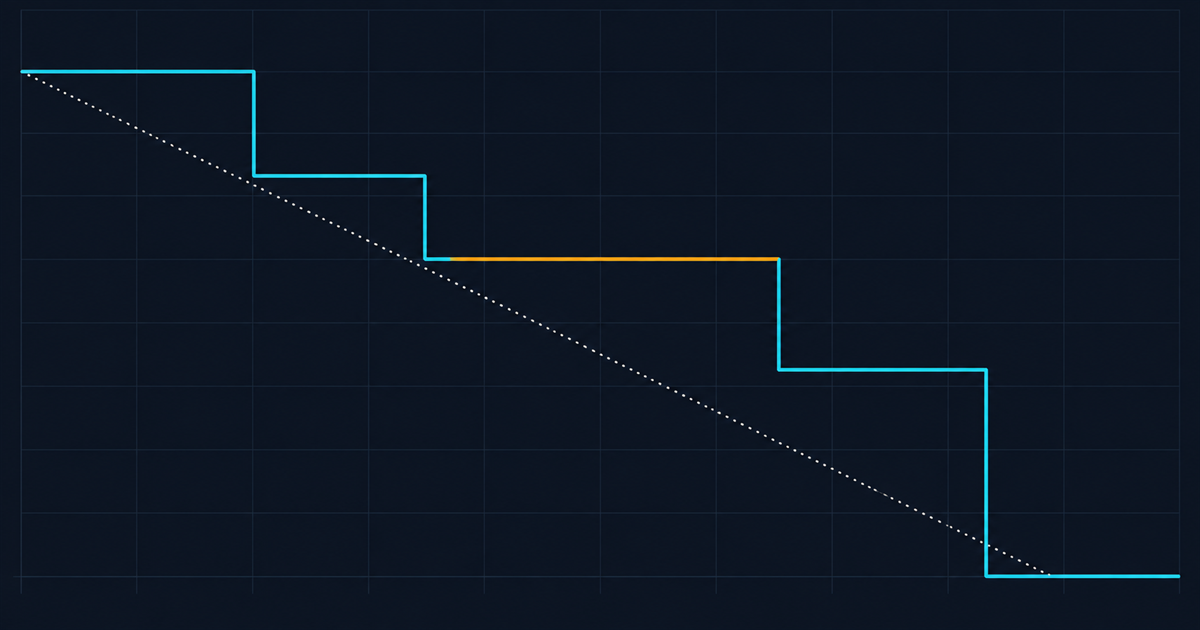
    A migration burndown chart with a cyan staircase line above a dotted linear plan, and one amber plateau where validation stalled

    How long does it actually take?

    Depends almost entirely on metadata quality, not on volume. Two useful reference shapes:

    Well-described library, consistent conventions, good embedded metadata. Six to ten weeks for a few hundred thousand assets, and most of that is validation rather than transfer.

    Inconsistent conventions, minimal embedded metadata, context in people’s heads. Four to nine months for the same volume, and the variance is entirely in how much manual cataloguing you accept versus how much you leave undescribed.

    The lever is step three. Every asset you decide not to migrate is an asset you do not have to describe, and describing is the expensive part. Teams that migrate everything spend the difference on cataloguing material nobody will search for.

    The thing that actually derails it

    Not technology. Scope creep dressed as quality improvement.

    Halfway through, somebody proposes fixing the taxonomy while we are in here. Then improving the descriptions. Then adding the fields we always wanted. Each is individually reasonable and collectively they turn a migration into a re-cataloguing programme with a migration attached, and the go-live date moves twice.

    Migrate to the schema you designed, with the data you have. Improve afterwards, as business as usual, against the metrics in designing a taxonomy people actually use. A live system with adequate metadata beats a perfect one that is still three months out, and the difference in adoption between those two outcomes is enormous.

    Before any of this, be sure you have decided what you are migrating away from and why. Why the shared drive stops working covers the diagnosis, headless DAM covers what you need from the target platform’s API to script any of this, and if the destination is still open, alternatives to a traditional enterprise DAM is worth reading before you commit. The foundation is in what enterprise DAM actually is.